Product Matcher
Run a match
Start a match run for your group, see what it costs before it starts, and stop it if you need to. You start the run yourself. Before the run starts, the most it can cost is held in your wallet. If your wallet holds too little, the run does not start and nothing is charged.
- Open your group in My Data, pick the Matching tab, then Match the data.
- Check your lines between Your list and each Compared shop (see Set up a match). If you see Unsaved changes, press Save config first.
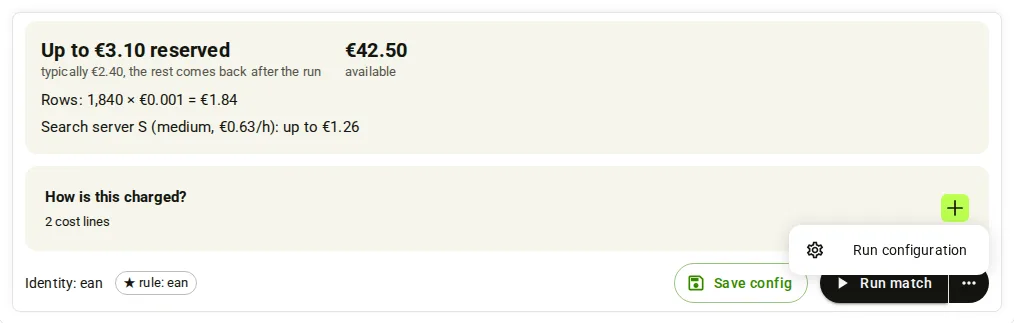
- Open the 3-dots menu next to Run match and pick Run configuration. Match settings shows the Run summary (your list, the lines and the shops) and the Schedule.
- Read the cost next to the button. It says “Up to” an amount “reserved” and what a run typically costs; the rest comes back after the run. Open How is this charged? to see each cost line.
- Press Run match. The button shows “Queuing…” and then Running. The amount is now held in your wallet.
- To end the run early, press Stop next to the button, then Stop run.
- When the run ends, open Results. Rows are split into Matched, No match and Review. The previous result is kept until the new run ends.
Note
The cost of the run is held in your wallet when it starts. When the run ends, you pay what it used and the rest comes back to your balance.
- Use a Full key. A Read key can read the cost but can save nothing and start nothing. Base address
https://portal.scrapewise.ai/api/scraper-api, headerAuthorization: Bearer <key>. - With a Read key, read the cost first:
GET /api/scraper/group/{id}/match/estimate.canStart: falsemeans your wallet is short bymissingMicros. - With a Read key, read the saved setup and its
version:GET /api/scraper/group/{id}/match. - With a Full key, send the same setup back with
PUT /api/scraper/group/{id}/match,"draft": falseand theversion. Send a newIdempotency-Keyheader. - The answer to the Full key call is 200 with
runPhase: "queued"and arunServerblock. The amount inrunServer.reserveMicrosis now held. - With a Read key, follow the run with
GET /api/scraper/group/{id}/match/config-status(statusisQUEUED,INITIALorRUNNINGwhile it goes, thenCOMPLETEDorFAILED). - To stop it, with a Full key:
POST /api/scraper/group/{id}/match/{matcherJobId}/cancelwith a newIdempotency-Keyheader.matcherJobIdis theidfrom the answer of step 5.
curl -X PUT "https://portal.scrapewise.ai/api/scraper-api/api/scraper/group/[GROUP ID]/match" \
  -H "Authorization: Bearer $SCRAPEWISE_FULL_KEY" \
  -H "Idempotency-Key: [NEW UUID]" \
  -H "Content-Type: application/json" \
  -d '{ "masterData": [MASTERDATA FROM YOUR READ], "scope": [SCOPE FROM YOUR READ], "version": "[VERSION FROM YOUR READ]", "draft": false }'
{ "id": "[JOB ID]", "status": "INITIAL", "runPhase": "queued",
  "runServer": { "sizeClass": "M", "reserveMicros": 1932750 } }
Amounts end in Micros: 1,000,000 is EUR 1. 1932750 is EUR 1.93.
The estimate answer:
{
  "sizeClass": "M",
  "customerPricePerHourMicros": [PRICE PER HOUR],
  "perRowMicros": 150,
  "scopeRows": 50000,
  "lines": [
    { "tier": "server", "units": 6, "unitPriceMicros": [PRICE PER HOUR], "maxMicros": [AMOUNT], "typicalMicros": [AMOUNT] },
    { "tier": "rows", "units": 50000, "unitPriceMicros": 150, "maxMicros": 7500000, "typicalMicros": 7500000 },
    { "tier": "pictures", "units": 1240, "unitPriceMicros": 1500, "maxMicros": 1860000, "typicalMicros": 1860000 }
  ],
  "reserveMicros": [AMOUNT], "typicalMicros": [AMOUNT],
  "balanceMicros": [AMOUNT], "reservedMicros": 0, "availableMicros": [AMOUNT],
  "canStart": true, "missingMicros": 0, "chargeFrom": "2026-11-03T00:00:00Z"
}
Note
With draft set to true, the same PUT only saves. Nothing is held and no run starts.
- Connect your assistant with a Full key. A Read key can ask for the cost but cannot start a run.
- Ask for the cost first: tool
scrapewise_get_matcher_run_estimate(Read). Ask the assistant to tell you the amount held and the typical cost. - Ask it to read the setup and its
version:scrapewise_get_matcher_job(Read). - When you agree to the cost, ask it to start the run:
scrapewise_update_matcher_job(Full) with the same setup, theversion,draftset tofalseand a newidempotency_key. - Ask it to follow the run with
scrapewise_get_matcher_config_status(Read). - To stop a run, use Stop in the portal or the cancel call in the API tab. There is no MCP tool to stop a match run (the cancel call needs a Full key).
scrapewise_update_matcher_job
{
  "id": "[GROUP ID]",
  "idempotency_key": "[NEW UUID]",
  "body": { "masterData": [FROM scrapewise_get_matcher_job], "scope": [FROM scrapewise_get_matcher_job], "version": "[VERSION]", "draft": false }
}
Note
Ask your assistant to show you the estimate and to start only after you agree to the cost.
Costs
A run costs server time, rows and pictures. The estimate shows the cost before you start. In the portal, open How is this charged? next to Run match:
Search server M (cpx52, EUR [PRICE]/h): up to EUR [AMOUNT]
Rows: 50,000 × EUR 0.00015 = EUR 7.50
Pictures: 1,240 × EUR 1.50 per 1,000 = EUR 1.86
Pictures are counted only when photos are compared, see Photo check. The server price depends on the size of your group.
- Held, then settled. When the run starts, the most it can cost is held (“Up to … reserved”). When it ends you pay what it used; the rest comes back.
- Our fault, no charge. If the server fails to start, or the run stops because of a fault on our side, you pay nothing.
- You stop it. If you stop a run after its server is ready, the started hours are charged.
- History. After the run, the Cost column in History shows what you paid, for example “Server EUR 0.40 + rows EUR 0.10 + 1,200 pictures EUR 1.80”.
Errors you may see
reserveMicros (needed), availableMicros and missingMicros, and the text “Matching did not start: … Top up … and run again. The previous result is kept.”version.{
"code": "FLOW_RUN_SERVER_WALLET_LOW",
"message": "Matching did not start: this run needs up to €1.93 and your available balance is €0.50. Top up €1.43 and run again. The previous result is kept.",
"reserveMicros": 1932750, "availableMicros": 500000, "missingMicros": 1432750,
"errors": [ { "code": "FLOW_RUN_SERVER_WALLET_LOW", "message": "...", "reserveMicros": 1932750, "availableMicros": 500000, "missingMicros": 1432750 } ]
}
The other money stop, 402 WALLET_INSUFFICIENT_BALANCE, is for scrapes and requests, not for match runs. See Wallet and billing.
Questions
Is my old result lost when I start a new run?
No. The previous result is kept until the new run ends. A run that fails or is stopped leaves the old result in place.
Can I stop a run?
Yes. While a run is going, Stop sits next to Run match and on the run’s row in History. If you stop after the server is ready, the started hours are charged.
What happens to a scheduled run when my wallet is low?
It is skipped. History shows it with “Not started: balance too low”. Top up and run again. See Schedule and history.
How do I remove the setup?
In Match settings, press Delete matching configuration. It removes only the setup; matched results and history stay. You cannot delete while a run is going.
What do Floor and Max do?
Rows of a step under Floor are no match, at or above Max a match, in between go to review. See Steps, Floor and Max.
Everything on this screen
Run, stop and wallet:
- Run this match again? or Run a new match?: the question before a run. Run or Create job & run starts it.
- Stop this matching run?: Stop run ends it, Keep running closes the question.
- Not enough balance for this run: nothing was started and nothing was charged. Top up balance opens the top-up, Not now closes the window.
- Your balance is empty: shown when the wallet has nothing left.
- Delete the current matching configuration? and Delete configuration: removes the setup after you confirm.
- Delete all matching data…: removes every match result of the group. Delete ALL matching data for this group? asks you to type the group name in Type the group name to confirm, then press Delete everything.
Last updated 4 November 2026