Product Matcher
Match quality
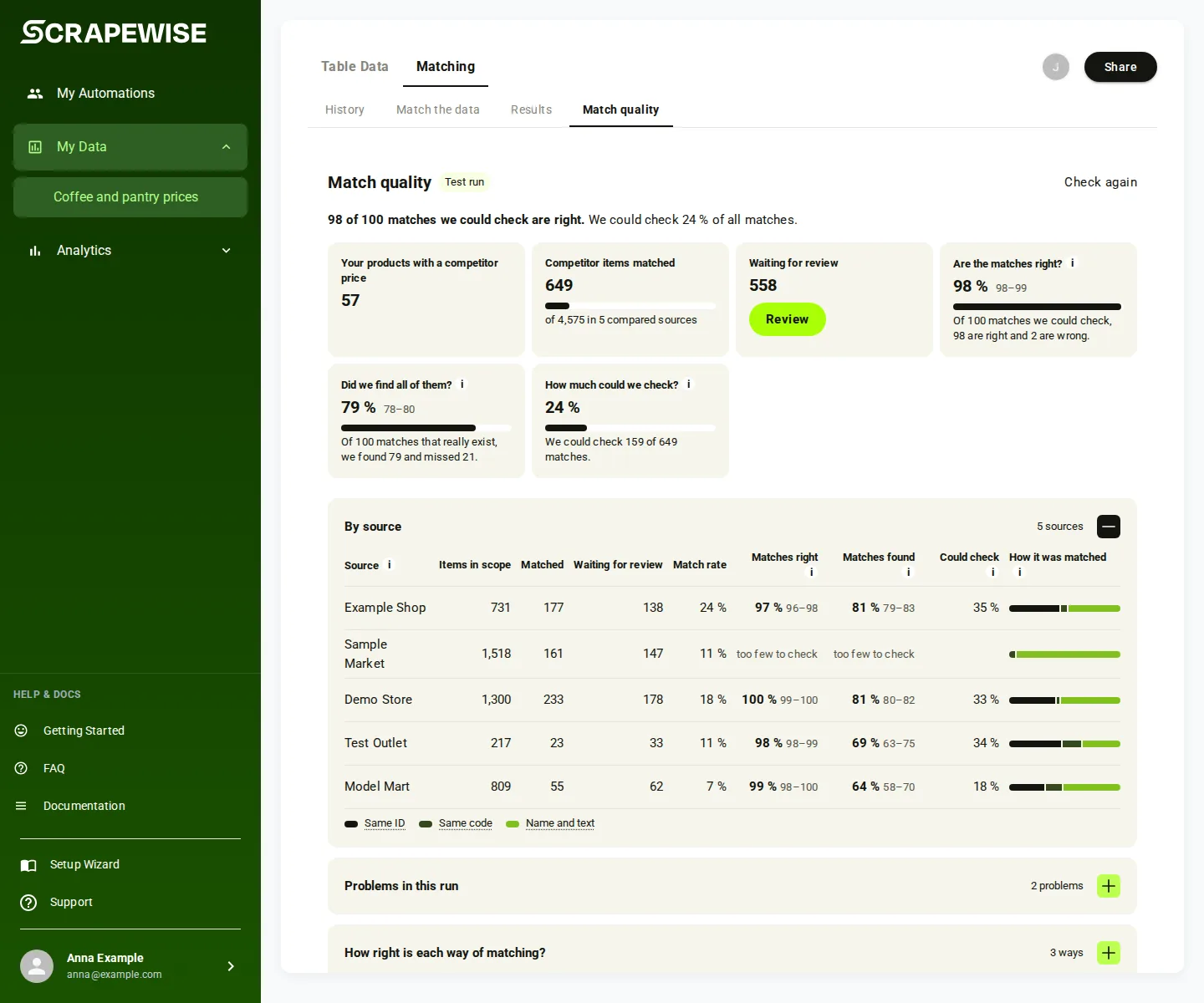
After a run, Match quality tells you how much of your list got a competitor match and, where the run could be checked against known codes, how many of the matches are right.
- Open your group, pick Matching, then Match quality. The tab is there after a finished run.
- Read the tiles. Each tile shows only when the run has a real number for it:
- Your products with a competitor price: your products that got at least one match.
- Competitor items matched: matched rows out of all rows in the compared shops, with a bar for the match rate.
- Waiting for review: pairs left to decide. Review opens them in Results.
- “Are the matches right?”, “Did we find all of them?” and “How much could we check?”: only when the run could be checked against known codes.
- The line under the title says which run this is (“Run of” a date) and when the data was scraped.
- Open By source to see each shop: Items in scope, Matched, Waiting for review and Match rate. Use Search sources to find one shop.
- Open Problems in this run, How right is each way of matching?, Right item, right variant? and Settings used for this run for more detail.
- Press Check again to check the run again, for example after you decided review pairs. While it checks, the old numbers stay. A run that was not checked yet has Check now.
- A run can carry a Test run tag in the list and on its card. The tag only labels the run: you can still tick it and compare it with another run.
- To compare two runs, open History, tick two rows and press Compare 2 runs.
- Reads work with a Read key; a new check or a compare needs a Full key. Base address
https://portal.scrapewise.ai/api/scraper-api, headerAuthorization: Bearer <key>. - With a Read key, list the runs with their grade totals:
GET /api/scraper/group/{id}/match/runs(paged,sizeup to 100). - With a Read key, read one run’s grade:
GET /api/scraper/group/{id}/match/runs/{runId}/grade. It has the totals and one page of shops. - With a Full key, check a run again:
POST /api/scraper/group/{id}/match/runs/{runId}/grade. This is Check again. - With a Full key, compare two graded runs:
POST /api/scraper/group/{id}/match/runs/diff. With a Read key, read the result:GET /api/scraper/group/{id}/match/runs/diff/{diffId}. - With a Read key, see which quality features are on for your account:
GET /api/scraper/group/{id}/match/quality/features. - To check your data before a run, with a Full key:
POST /api/scraper/group/{id}/match/precheck; read it with a Read key:GET /api/scraper/group/{id}/match/precheck/{precheckId}.
curl -H "Authorization: Bearer $SCRAPEWISE_READ_KEY" \
  "https://portal.scrapewise.ai/api/scraper-api/api/scraper/group/[GROUP ID]/match/runs?page=0&size=20"
The audit set of a run (GET .../match/runs/{runId}/audit, Read) is a random sample you can answer with POST .../match/runs/{runId}/audit/verdicts (Full): approve, reject or unsure.
- Connect your assistant with a Read key.
- Ask it for the group’s runs:
scrapewise_get_matcher_history(Read). Each row has the status, the times andexpectedRowCount(matched rows of a finished run). - The quality numbers (grade, compare, audit) have no MCP tool, for a Read key or a Full key. Use the portal or the API tab.
Errors you may see
Questions
What does Are the matches right? mean?
Of 100 matches we could check, how many are right. The small numbers show the range the real number is very likely in.
What does Did we find all of them? mean?
Of 100 matches that really exist, how many this run found.
Why do I see only two tiles?
The right / found numbers need known codes on both sides. Without them the run cannot be checked, so only the counts show.
Do the numbers change after I review?
Yes. After you decide pairs, the run is checked again by itself. The old numbers stay until the new ones are ready.
Everything on this screen
Runs panel:
- The basis chip shows what a number is based on.
- Wrong → right and Right → wrong: pairs whose verdict changed because of your review, from wrong to right or from right to wrong.
- Tick run: tick a run to compare it with another run.
Last updated 4 November 2026