Account
API keys
An API key lets your code or your AI assistant act as you. You make keys in the portal.
Read or Full
Read key: look at data. Full key: also change things and start runs. Every page in these docs says which key a step needs. When in doubt, start with a Read key.
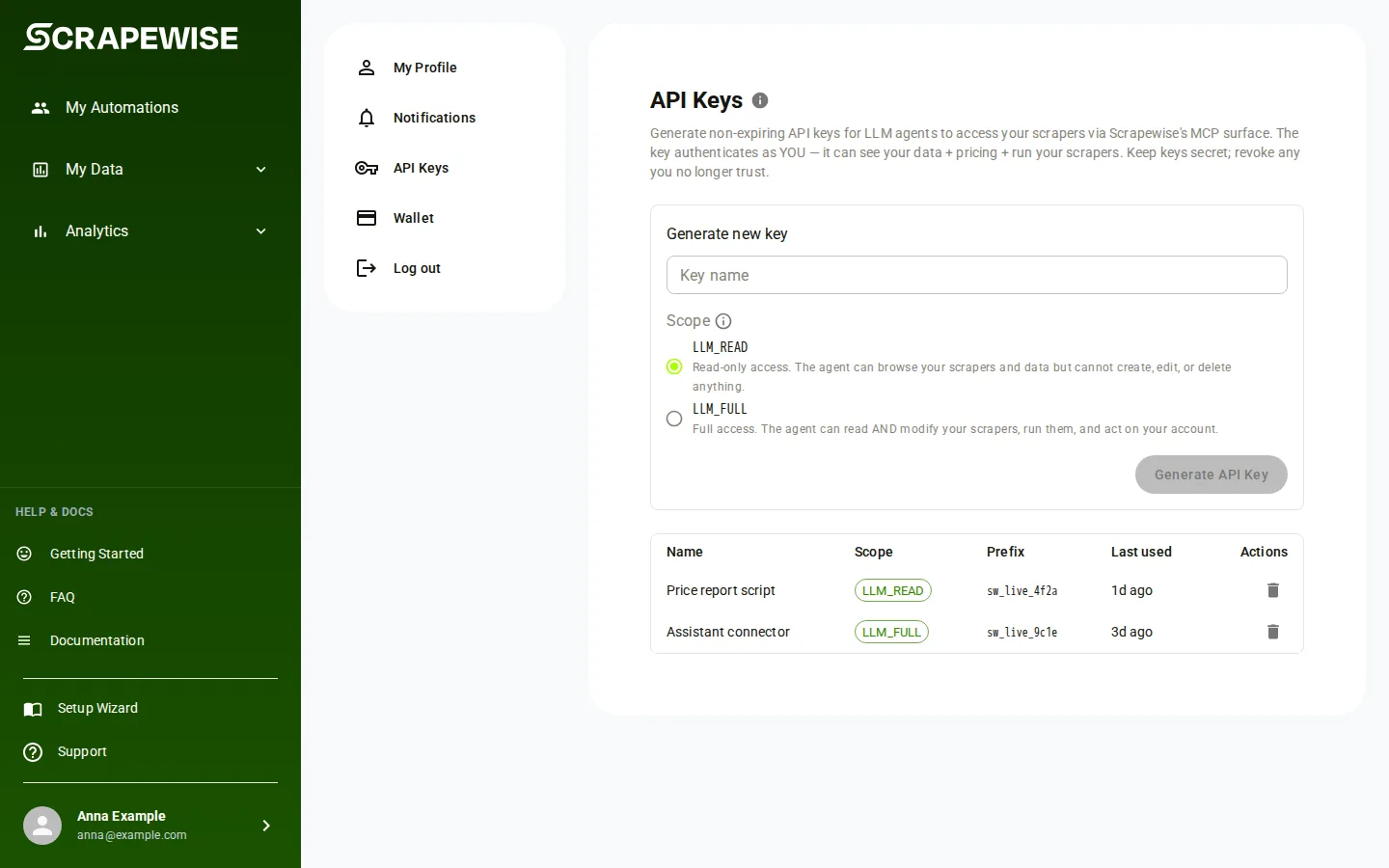
The portal shows the two kinds as codes on the Scope choice: LLM_READ is the Read key and LLM_FULL is the Full key. You see the same codes in the key list and in the answer of GET /api/key/whoami. Everywhere else these docs say Read key and Full key.
- Press your name and email at the bottom of the left portal menu. Your settings open on My Profile. Pick API Keys in the list on the left (the address is
portal.scrapewise.ai/settings/api-keys). This is the path every page in these docs means by “your name at the bottom of the portal menu, then API Keys”. The docs menu section called Account is only the docs, not a portal menu. - Under Generate new key, type a Key name, for example
claude-agentorproduction-mcp. Use one name per tool, so you can revoke one key without touching the others. - Under Scope, pick LLM_READ for a Read key or LLM_FULL for a Full key. LLM_READ is selected by default. Start with it.
- Press Generate API Key.
- The window API key generated opens. It says “This key will not be shown again”. Press Copy to clipboard and save the key somewhere safe. The window also shows ready-made setup text for Claude Code, Claude Desktop, Cursor and VS Code.
- Tick I have saved this key securely, then press Close. Close stays grey until you tick the box.
- The new key appears in the list with its Name, Scope, Prefix and Last used. The secret is never shown again.
- To stop a key working, press Revoke key on its row, then Revoke in the question “Revoke API key?”. The key stops working at once. Press Cancel to keep it.
Note
If you closed the page before you ticked the box, the page shows “Key may not have been saved” the next time. That key is live. Revoke it and make a new one, or press Dismiss if you did save it.
- Make a Read key or a Full key in the portal first. Over the API, a key cannot make, list or revoke keys. These routes (
PUT /api/key/generate,GET /api/key/list,DELETE /api/key/{id}) answer only to a signed-in portal session. - Send the key in the
Authorizationheader, never in the address:Authorization: Bearer sw_live_<prefix>.<secret>. Base addresshttps://portal.scrapewise.ai/api/scraper-api. - To check a key, call
GET /api/key/whoamiwith a Read key or a Full key. - The answer names your account, the key’s scope (
LLM_READis a Read key,LLM_FULLis a Full key) and its prefix. It also has atoolsetslist, which you can ignore: it never limits a key. A401means the key is wrong or revoked.
curl -H "Authorization: Bearer $SCRAPEWISE_KEY" \
  "https://portal.scrapewise.ai/api/scraper-api/api/key/whoami"
import os, requests

r = requests.get(
    "https://portal.scrapewise.ai/api/scraper-api/api/key/whoami",
    headers={"Authorization": f"Bearer {os.environ['SCRAPEWISE_KEY']}"},
)
print(r.json())
const r = await fetch("https://portal.scrapewise.ai/api/scraper-api/api/key/whoami", {
  headers: { Authorization: `Bearer ${process.env.SCRAPEWISE_KEY}` },
});
console.log(await r.json());
{
  "customerRef": "[YOUR ACCOUNT ID]",
  "scope": "LLM_READ",
  "prefix": "[8 CHARACTERS]"
}
Which routes a key can call:
- Make a Read key or a Full key in the portal (see Read or Full above), then give it to your assistant. See Connect your assistant (MCP) for where to paste it.
- A Read key lists the read tools. A Full key lists every tool.
- Your assistant cannot make or revoke keys. The tools
scrapewise_create_api_keyandscrapewise_delete_api_key(Full) andscrapewise_list_api_keys(Read) are in the tool list, but their routes only accept a portal sign-in, so a key is refused. Make, list and revoke keys in the portal.
Errors you may see
Bearer and a space before the key, and that you copied the whole sw_live_... text.Retry-After header.Questions
Which key should I make?
Make a Read key first. It is enough to look at your groups, rows and results. Make a Full key only for an assistant you trust to create, run and delete, or for code that does so.
Does a key expire?
No. A key works until you revoke it. Anyone who has it acts as you, so keep it secret and revoke keys you no longer use.
I lost the key. Can I see it again?
No. Scrapewise keeps only a scrambled copy. Revoke the key and make a new one.
Can I put the key in a web address?
Never. A key in an address ends up in browser history and server logs. Use the Authorization: Bearer header only.
What does Last used tell me?
The last time anything called Scrapewise with this key. A key that shows “Never used” or an old date and that you do not recognise is a good one to revoke.
What is the Legacy label on a key?
An older key made before the two key types existed. It still works until you revoke it. Make a Read or Full key to replace it.
Everything on this screen
API keys page:
- Retry: loads the key list again if it failed to load.
- Generated API key value: the box that shows the new key once. Copy key to clipboard copies it. You cannot see it again after you close the dialog.
- Revoke API key?: the question before a key is removed. Revoking cannot be undone.
- Claude Code, Claude Desktop, Cursor and VS Code: tabs with the setup text for that app. Copy copies it.
Last updated 4 November 2026