Product Matcher
Results and review
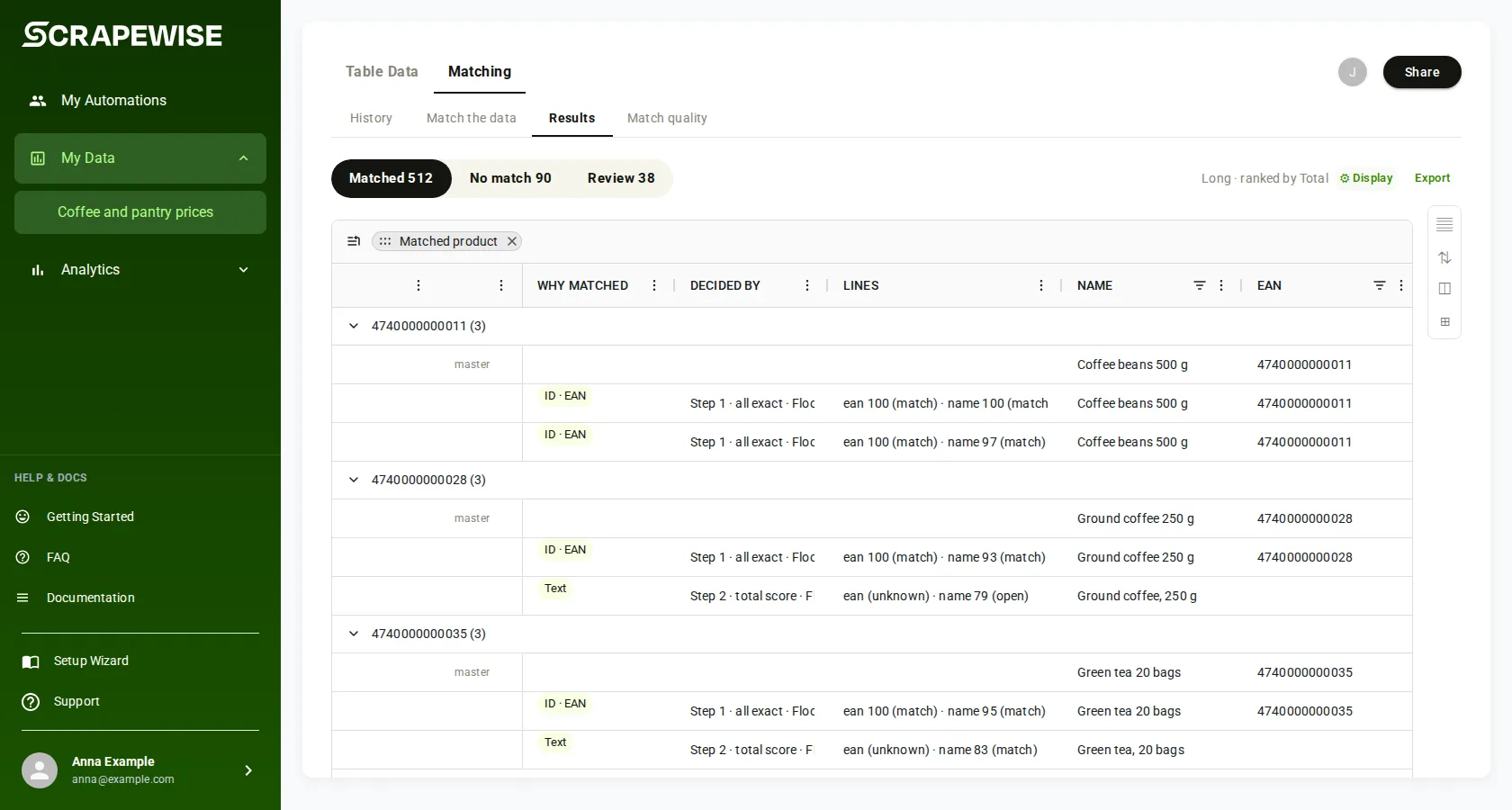
When a run has ended, Results shows every compared row of the run. Each row is Matched, No match or waits for Review. Three columns tell you why.
- Open your group, pick Matching, then Results. The tab is there after the first finished run.
- Pick a pill: Matched, No match or Review. Each pill shows its count.
- Read the three columns on each row:
- Why matched: how the match was made, for example “Code”, “Text”, “Saved review decision” or “Approved in review”. A dash means a run from before these columns, or a match proven by the same EAN or maker code (the portal does not name these yet; the API field
matchBasissaysEANorMPN). - Decided by: the step and rule that decided, for example “Step 2 · total score · Floor 40, Max 70 (shop)”. “Before the steps” means a check before step 1 decided.
- Lines: each line’s result, for example “sku 100 (match) · name 62 (no)”. A photo line can show (not scored) or (not checked).
- Why matched: how the match was made, for example “Code”, “Text”, “Saved review decision” or “Approved in review”. A dash means a run from before these columns, or a match proven by the same EAN or maker code (the portal does not name these yet; the API field
- To see the scores, press Show system fields. The group Technical matching fields holds
totalScore(the total score),matchScore,photoScore(the photo score),descScoreand more. - Rank by orders the pairs: Total, Name, Photo or Description.
- To decide the pairs that wait, pick Review. Each card shows your item on the left and the shop item on the right, with their pictures.
- Every card counts as a match unless you flag it. Tap a card to flag it as not a match and add a reason if you want.
- Under a card, press the strip “I’ve reviewed to here” to send every pair from the top down to that card. Flagged pairs are rejected, the rest approved.
- Fields picks the values shown under both pictures (Both sides, Left only, Right only, Technical). Pairs narrows the review to some shops; Show all clears it.
- To undo one decision, press Unmatch on the approved row in Results. To undo all of them, use Unmatch all reviewed… below History. Careful: this puts every pair you approved, in every match setup of the group, back into Review and deletes your decisions, so you must decide them again. Your setup, run history and the matcher’s own matches stay. You type the group name to confirm.
- Reads work with a Read key; decisions need a Full key. Base address
https://portal.scrapewise.ai/api/scraper-api, headerAuthorization: Bearer <key>. - With a Read key, read the counts and the ids of the active run:
GET /api/scraper/group/{id}/match/buckets. KeepactiveConfigIdandactiveMatcherRunId. - With a Read key, read the rows:
GET /api/scraper/group/{id}/match/data?bucket=matched&page=0&size=1000.bucketisall,matched,revieworno. - To keep a multi-page read (Read key) on one run, add
"matcherRunId":"<activeMatcherRunId>"to thefiltersJSON on every page. - With a Read key, list the pairs that wait for review:
GET /api/scraper/group/{id}/match/{configId}/review/ids. UseactiveConfigIdasconfigId. - With a Read key, read the pair details:
POST /api/scraper/group/{id}/match/{configId}/review/by-idswith{"ids": [...]}, at most 500 ids per call. - With a Full key, send your decisions:
POST /api/scraper/group/{id}/match/{configId}/review/verdicts, at most 200 rows per call, with anIdempotency-Keyheader. - With a Full key, undo one decision with
POST .../match/{configId}/review/unmatch, or all of them withPOST .../match/review/unmatch-all. Unmatch all puts every approved pair of the group back into review and deletes those decisions; it cannot be undone.
curl -H "Authorization: Bearer $SCRAPEWISE_READ_KEY" \
  "https://portal.scrapewise.ai/api/scraper-api/api/scraper/group/[GROUP ID]/match/data?bucket=matched&page=0&size=1000"
{
  "content": [
    { "title": "Rain jacket M blue", "sku": "RJ-100-M-BLU", "matchDecision": "MATCH",
      "matchScore": 94.5, "totalScore": 94.5, "photoScore": 91.0, "matchBasis": "EAN",
      "decidedBy": { "step": 1, "rule": "all-exact" },
      "sourceName": "shop-a", "matcherRunId": "[RUN ID]" }
  ],
  "totalElements": 8120, "totalPages": 9, "number": 0, "size": 1000
}
| Param | What it does |
|---|---|
bucket | all (default), matched, review or no |
page, size | Page from 0; size up to 10,000 |
sort | For example matchScore,desc |
filters | URL-encoded JSON, for example {"sourceName":"shop-a"}. A value that cannot be read is ignored. |
view | long (one row per compared product) or wide (one row per product of your list, matched only) |
loadAll | true returns the whole bucket, up to 5,000 rows (long view only) |
POST /api/scraper/group/[GROUP ID]/match/[CONFIG ID]/review/verdicts
Authorization: Bearer <full key>
Idempotency-Key: [NEW UUID]
Content-Type: application/json

{ "snapshotTs": 1760854323000,
  "rows": [ { "pairKey": "[KEY FROM review/ids]", "verdict": "approve" },
            { "pairKey": "[KEY]", "verdict": "reject", "note": "different colour" } ] }
The answer is {"accepted": 2, "rejected": 0}. Sending the same verdict again is safe.
- Connect your assistant with a Read key to read, or a Full key.
- Ask it whether the last run ended:
scrapewise_get_matcher_config_status(Read).lastMatchedAtis when matching last finished. - Ask it for the daily file of matched rows:
scrapewise_get_matched_export_latest_status(Read) says whether the file is ready and gives its address. See Schedule and history. - Reading single rows and deciding review pairs have no MCP tool, for a Read key or a Full key. Use the portal or the API tab for those.
Your decisions are kept on the next run
A decision is saved for the pair, not only for today’s rows. On every new run, an approved pair is matched again and a rejected pair is not suggested again. After you decide pairs, Match quality is checked again by itself; the old numbers stay on screen until the new ones are ready.
Matched row fields
| Field | Meaning |
|---|---|
matchDecision | MATCH, REVIEW or NO |
totalScore / matchScore | The total score, 0 to 100 |
photoScore | The photo score, when photos were compared |
descScore | The description score |
matchBasis | What decided a match: EAN, MPN, CODE, TEXT, or VERDICT (a saved review decision) |
decidedBy | The step (step), the rule (rule) and the limits (band) that decided |
matchLines | Each line’s result and score (the Lines column) |
masterRef | The linked row of your list |
reviewMasterRef | On review and no-match rows: the closest product of your list |
gatesFired | The checks that fired while deciding |
sourceName | The shop |
matcherRunId, matchedAt | The run that wrote the row and when |
Errors you may see
bucket, or bucket with view=wide.Idempotency-Key header.Questions
Why is Results not there?
Results appears after the group’s first finished run. Until then you see only Match the data.
Where are the text score, the photo score and the total score?
Press Show system fields and look under Technical matching fields: totalScore, photoScore and the line scores. Lines shows each line’s score in short.
Does a new run undo my review?
No. Approved pairs stay matched and rejected pairs stay out on every new run.
How do I get all matched rows as a file?
Use the daily matched file, see Schedule and history.
Everything on this screen
Review the pairs:
- Right match, Wrong match and Not sure: your decision on a pair.
- To check, Checked, To review and Audit: the lists of pairs. The number is how many pairs are in it.
- Total, Photo and Desc: order the pairs by the total score, the photo score or the description score.
- The strip “I’ve reviewed to here” saves every pair from the top down to that card. Flagged pairs are rejected, the rest approved. It reads Submitting while it saves.
- Each card shows your item and the shop item. Where a photo check ran, a small panel shows what the photo check read from both pictures.
- After you flag a card you can pick a reason from a list or type your own: why is it wrong?
- Under the pictures, the field lines show the values chosen in Fields.
- In the wide view, badges count the rows of the long view. The wide view pivots accepted matches.
Display and export:
- Display: Long shows one row per pair, Wide one row per match. Matching fields only hides the other columns, Visible columns and All columns pick which columns show, and Description shows the description.
- When the Display panel is folded, a narrow strip of buttons opens it again: the layout, Rank by, Show system fields, Matching fields only, and an arrow to open the panel.
- Export: downloads the matched rows as JSON Lines or CSV.
Undo all your decisions:
- Unmatch ALL hand-reviewed matches for this group? and Unmatch everything: undo every decision you made by hand. The pairs go back to Review and your decisions are deleted. Type the group name to confirm.
Last updated 4 November 2026