Groups, rules and exports
Shared groups
You can share one of your groups with other people by email. You stay the owner. A person you share with sees your group next to their own and can work with its data, but not run your scrapers and not change your setup unless you grant it over the API.
- Open your group in My Data. Press the share button at the top of the group.
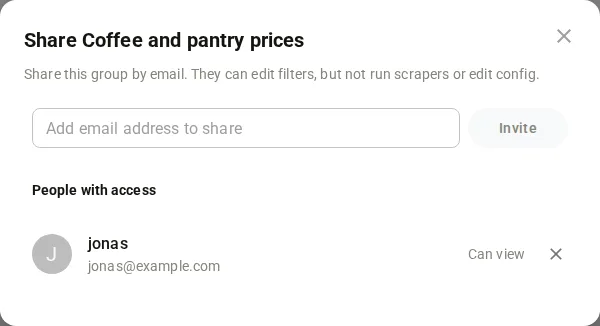
- The window is called “Share” and the group name. It says “Share this group by email. They can edit filters, but not run scrapers or edit config.”
- Type the address in Add email address to share and press Invite. A wrong address gets “Please enter a valid email address.” The window closes by itself after it worked.
- To see who has access, press the people icons next to the share button (View users). People with access lists every address. If nobody is there it says “No one else has access yet.”
- To take access away, press the remove button next to the address.
- A person who received a share sees the group under Shared Data in the left menu. They open it like any group. They cannot share it further.
Note
Taking access away is immediate. You can invite the same address again later.
- Use a Full key to share or revoke, a Read key to list. Base address
https://portal.scrapewise.ai/api/scraper-api. Send a newIdempotency-Keyheader on every PUT and DELETE. - List the groups others shared with you, with a Read key:
GET /api/scraper/shared/group/list. - List who has access to a group you own, with a Read key:
GET /api/scraper/shared/group/{id}/list. The answer is a list of email addresses. - Share with a Full key:
PUT /api/scraper/shared/group/{id}with a list of people. Each has anemailand three rights:hasFiltersEditRights(defaulttrue),hasScraperRunningRights(defaultfalse) andhasConfigEditRights(defaultfalse). Sharing the same address again changes nothing. - Take access away with a Full key:
DELETE /api/scraper/shared/group/{id}?email=<address>. One address per call.
curl -X PUT "https://portal.scrapewise.ai/api/scraper-api/api/scraper/shared/group/[GROUP ID]" \
  -H "Authorization: Bearer $SCRAPEWISE_FULL_KEY" \
  -H "Idempotency-Key: [NEW UUID]" \
  -H "Content-Type: application/json" \
  -d '[ { "email": "alice@example.com", "hasFiltersEditRights": true, "hasScraperRunningRights": false, "hasConfigEditRights": false } ]'
Read the shared data with the normal read routes, for example GET /api/scraper/data/group/{id}. The share covers that one group only.
- Connect your assistant with a Full key to share or revoke, or a Read key to look. See Connect your assistant (MCP).
- Ask which groups were shared with you:
scrapewise_get_scraper_shared_group_list(Read). - Ask who has access to one of your groups:
scrapewise_list_scraper_shared_group_list(Read). - Ask to share a group with an address:
scrapewise_update_scraper_shared_group(Full). - Ask to take access away:
scrapewise_stop_scraper_shared_group(Full), one address at a time.
Groups shared with you
Groups other people shared with you are not in your own list of groups. They are under Shared Data in the portal. Over the API, GET /api/scraper/shared/group/list returns them (Read). Over MCP the tool is scrapewise_get_scraper_shared_group_list (Read).
Errors you may see
Questions
What can the other person do?
By default they can use the filters on the group’s data. They cannot run your scrapers or change your setup. Over the API you can grant more with the three rights.
Does the other person need an account?
Yes. You can only share with an address that already has a Scrapewise account. Ask them to sign up first with the same address, see Sign up. Scrapewise sends them no invite email, so tell them yourself. After you share, they sign in as usual and find the group under Shared Data.
Can I take access away from many people at once?
No. Take it away one address at a time.
Does sharing give access to my other groups?
No. Only the group you shared.
Everything on this screen
Share window:
- Share Group: the window to share this group. Enter an email address to give that person view access. Without owner rights the same window only lists who can see the group.
- The close button at the top closes the window.
- The small cross next to a person removes that person’s access.
Last updated 4 November 2026