Groups, rules and exports
Saved categories
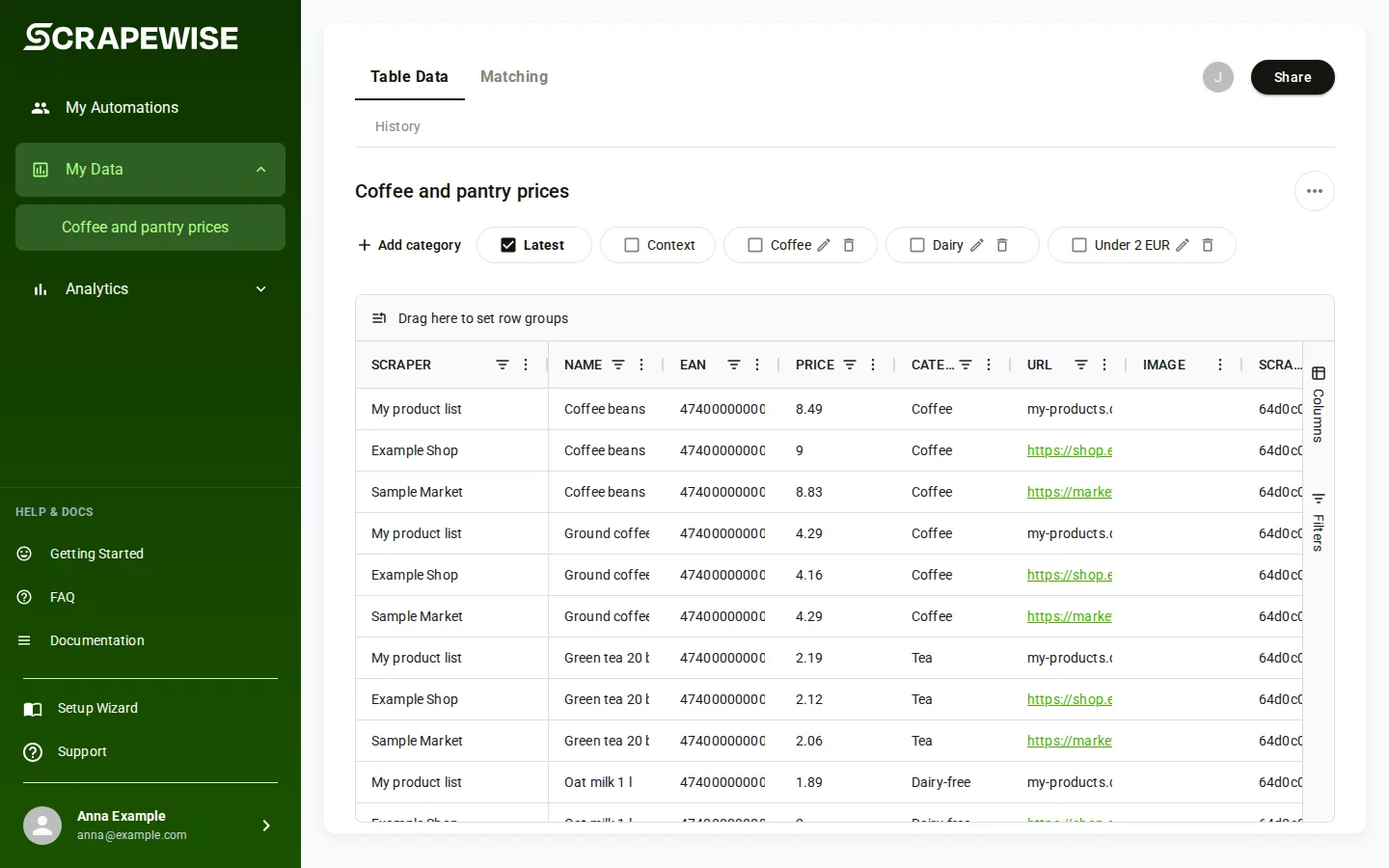
A category is a saved set of filters on a group’s data, for example “price under 20 and in stock”. It does not copy any data. It only remembers the filters, so you can open the same view again with one press.
- Open your group in My Data and set the filters you want on the data table.
- Above the table, press Add category. The window Create Custom Category says it will save your current filters for later use.
- Type a name in Category Name (“Enter category name”). Press Create Category, or Cancel to leave.
- The category appears as a button above the table. Press it to apply its filters.
- To change the filters of a category, press Edit filters on its button. Combine conditions with And or Or and pick an operator such as Equals, Not equals, Greater than or In list.
- To remove a category, press Delete category on its button. The data stays.
- To clear every applied category at once, open the menu above the table and choose Clear All Categories.
- Use a Read key to list and a Full key to change. Base address
https://portal.scrapewise.ai/api/scraper-api. Send a newIdempotency-Keyheader on every PUT and DELETE. - List the categories of a group with a Read key:
GET /api/scraper/data/group/{id}/categories. Each has anid, anameandfilters. - Create or update one with a Full key:
PUT /api/scraper/data/group/{id}/categorywithnameandfilters.filtersis JSON sent as one text string (see the format below). You can also copy it from a category you made in the portal. A category with the same name is updated. - Delete one in two calls. First, with a Full key,
POST /api/scraper/data/group/{id}/category/{categoryId}/preview-delete?categoryId=<id>. It returns a token that is good for 5 minutes. ThenDELETE /api/scraper/data/group/{id}/category/{categoryId}?categoryId=<id>. There is no rename: delete and create again. - Use
categoryId, not the name, in both delete calls (both need a Full key).
curl -X PUT "https://portal.scrapewise.ai/api/scraper-api/api/scraper/data/group/[GROUP ID]/category" \
  -H "Authorization: Bearer $SCRAPEWISE_FULL_KEY" \
  -H "Idempotency-Key: [NEW UUID]" \
  -H "Content-Type: application/json" \
  -d '{ "name": "Cheap and in stock", "filters": "{\"price\":{\"$op\":\"lessThan\",\"$type\":\"number\",\"$value\":20},\"availability\":{\"$op\":\"equals\",\"$type\":\"text\",\"$value\":\"in stock\"}}" }'
The filters text is one JSON object. Each key is a column name of the group’s data. Each value says how to test that column:
| Field | What it holds |
|---|---|
$op | The test. Text: contains, notContains, equals, notEquals, startsWith, endsWith. Numbers and dates: greaterThan, greaterThanOrEqual, lessThan, lessThanOrEqual, equals, inRange. Lists: in, notIn. Empty or not: blank, notBlank. |
$type | The kind of column: text, number, date, boolean or set. |
$value | The value to test against. A list for in and notIn. Left out for blank and notBlank. |
$valueTo | The upper end, only for inRange. |
Text tests ignore upper and lower case and match the value as written.
- Connect your assistant with a Full key to change, or a Read key to look. See Connect your assistant (MCP).
- Ask for the categories of a group:
scrapewise_get_scraper_data_group_categories(Read). - Ask to save or update one:
scrapewise_update_scraper_data_group_category(Full) withnameandfilters. - To delete, ask the assistant to preview first:
scrapewise_delete_scraper_data_group_category_preview(Full). Check the summary, then say yes. It commits withscrapewise_delete_scraper_data_group_category(Full). - To read rows through a category, ask for the group rows with
scrapewise_get_scraper_data_group_client(Read) and name the category.
Errors you may see
Failed to create custom category. Please try again.
The category was not saved. Press Create Category again.
402 on PUT category
Your account cannot save more categories, or saved categories are not part of your account. Write to support, see Errors.
400 category not found
The
categoryId does not exist in that group, or you used the name. List the categories and use the id.403 with a Read key
Saving and deleting need a Full key.
Questions
Does a category copy my data?
No. It saves the filters only. The table always shows the latest data that matches.
Can I rename a category?
No. Delete it and make it again with the new name.
What is the Custom Categories page?
A placeholder page in the portal. Make and open categories on the group’s data table.
Last updated 4 November 2026